TikTok is a globally popular short video platform where users can create and explore diverse content. While TikTok allows users to save videos, the downloaded files often include a watermark and may suffer from reduced quality. To save TikTok videos in their original, high-resolution format without a watermark, follow the steps below using Video/Image Downloader.
Steps
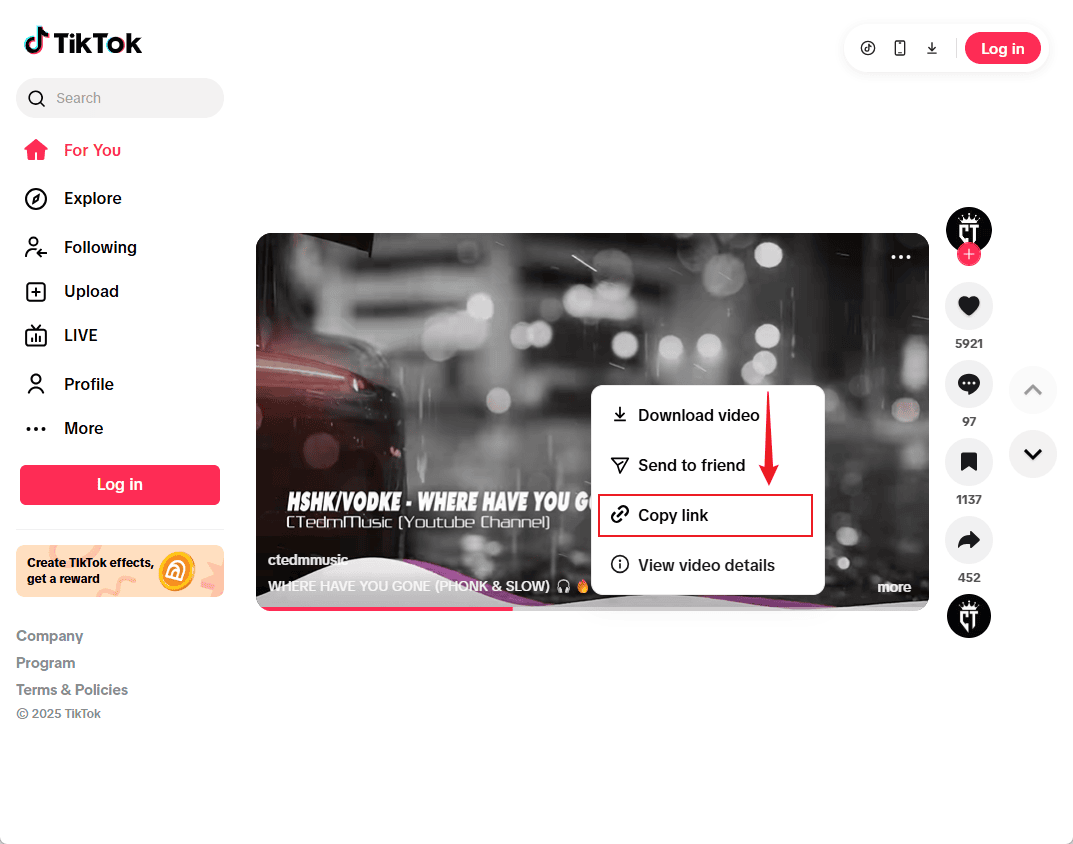
Step 1: Copy the TikTok video link
Open the TikTok app or website, find the video you want to save, tap the “Share” button, and select “Copy link”.
Step 2: Go to the Video/Image Downloader
Visit our Video/Image Downloader in your browser, and paste the copied link into the input field.

Step 3: Click "Download" to start parsing
Click the “Download” button to analyze the video. The system will display the available resources for download.
Step 4: Download the high-quality, watermark-free Video
From the extraction results, click the “Download” button to save the original high-resolution video.
FAQs
1. Can I download all TikTok videos without a watermark?
Most public videos are supported. However, some videos with privacy restrictions may not be extractable.
2. Are the downloaded videos in high quality?
Yes. Our tool always prioritizes the original resolution of the video for maximum quality.
3. Do I need to log in to use the tool?
Yes. You must log in to access the extraction and download features.
4. What should I do if extraction fails?
This may be due to network issues or video privacy settings. Try refreshing the page or contact support for help.