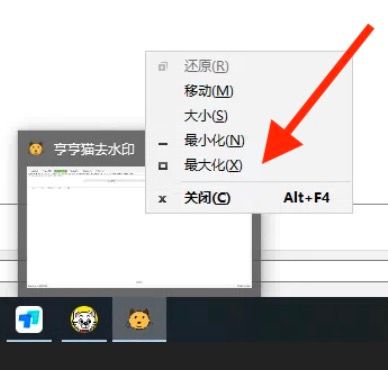
Sometimes an app appears as running on the taskbar, but no visible window shows up on your screen. This often happens when the window is off-screen or stuck in a minimised state.
Even if you press Alt + Tab, you can tell the app is open, and its icon is visible on the taskbar — but clicking it doesn’t bring the window to the front.
Solution
- Hover your mouse over the app’s icon on the taskbar. After a short delay, a thumbnail preview of the app window will appear;
- Right-click on the thumbnail preview and select Maximise. The window should now be restored and visible on the screen.